



You have set up file shares on your network between computers in the same workgroup.
But one PC does not detect other PCs.
So it sometimes happens that Windows 10 doesn’t see other computers Or vice versa.
This article helps you to make your computer visible in the list of networks in Windows 10.
Contents
Computer not visible on the network in Windows 10
Some reminders concerning the networking of computers on Windows:
- Computers must be part of the same working group. In general, this is the WORKGROUP.
- Security software, Windows Defender firewall should not block file shares.
- Windows network services should be started and not disabled. So watch out for optimizations and deactivation of Windows services.
Also see – error-code-0x80072ee7 Fix
Network discovery is disabled
For network discovery errors is disabled or an error code, go to this article.
It helps you repair the discovery of the network.
After repairing network discovery, check if it makes computers visible on the network.
Configure network discovery
Check the network discovery settings.
- To do this, do a search to open ” Manage advanced sharing settings“.

- Activate network discovery for the Private profile. If you also use the public profile, do so too.
There remains the case of legacy network devices on your network (old Windows version, Samba shares, NAS devices).
Activate the option “Enable file sharing for devices that use 40-bit or 56-bit encryption“
Test to see if it makes computers visible on the network.
Also see – Transfer data to new windows 10 Pc
Check Windows firewall settings
You must then authorize the discovery of the network on the Windows firewall.
This operation must be carried out on all PCs in the LAN network.
- Search Windows Defender Firewall
- Then on the left, select the option “Authorize an application“
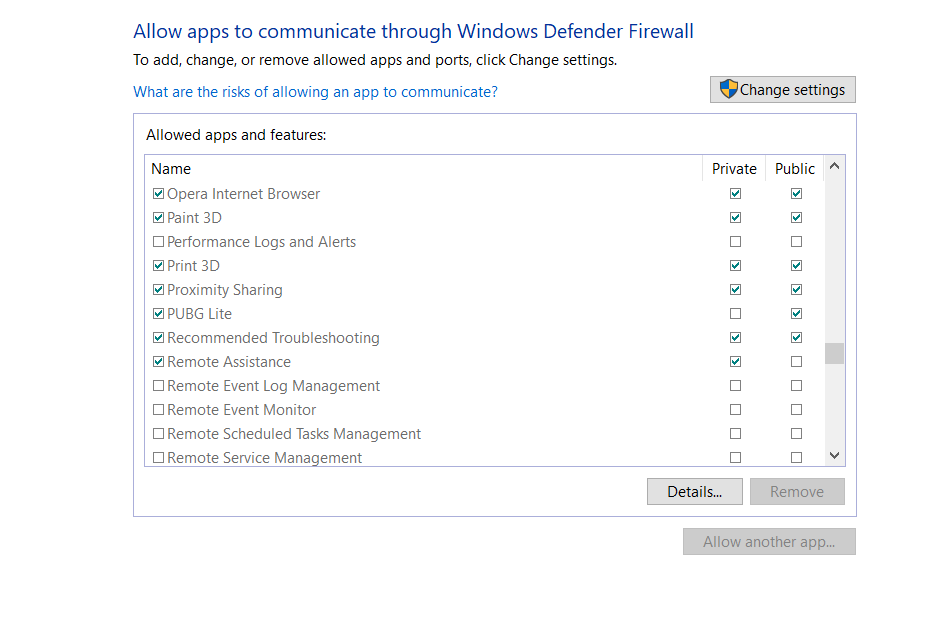
- In the list, the network search must be checked according to the network profile used.
Test to see if it makes computers visible on the network.
Change computer name
In some cases, the Windows computer may not display in the network environment due to incorrect workgroup settings.
Try adding this computer to the workgroup and changing the computer name.
Redefine the Browser Master
The Browser Master stores the list of computers in the workgroup.
If this last bug or malfunctions, it can cause computers on the network are not visible.
Then try to redefine the Browser Master.
For more information :
Activate SMB 1.0 Option
In some cs and in particular if you use an old NAS or multimedia server, you must activate SMB 1.0.
Indeed, these network devices work with the old version of SMB.
Here’s how to do it:
- Open the Windows Control Panel then Programs and Features.
- On the left, click on “Activate or deactivate Windows features
- Then in the list, look for SMB 1.0 CFS File Sharing Support and activate the client and server or only the one that interests you.

 After activation, a restart of the computer is required.
Windows 10 Network Reset
Finally, you can try to reset the Windows 10 network to fix the connectivity issues.
- Open Windows 10 settings
- Then select the Network and Internet
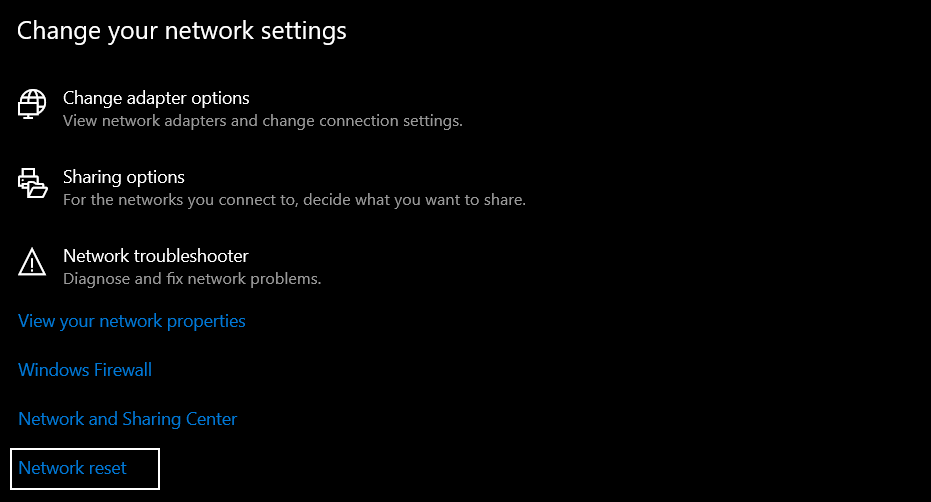
- Finally, at the bottom, click on Network reset
Here is an additional command-line method.
netsh int ip reset reset.txt
netsh winsock reset
netsh advfirewall reset
Conclusion
We hope that our tutorial has solved the Computer not visible on Windows 10 network issue. If not, please describe your issue in the comments below and we will try our best to solve it.
FAQs
Are these methods safe to follow?
Yes, these methods are completely safe. However, if you are a new user and don’t have any idea about the terms we mentioned, we recommend you to take help from an expert.
What if the issue doesn’t fix?
If the issue persists even after following the above listed methods, we will recommend you to contact Microsoft for support.
